Gamepad Usage Guide
1 Key Map
If you are using a Play Station like gamepad, the default key map should be the same as shown blow.
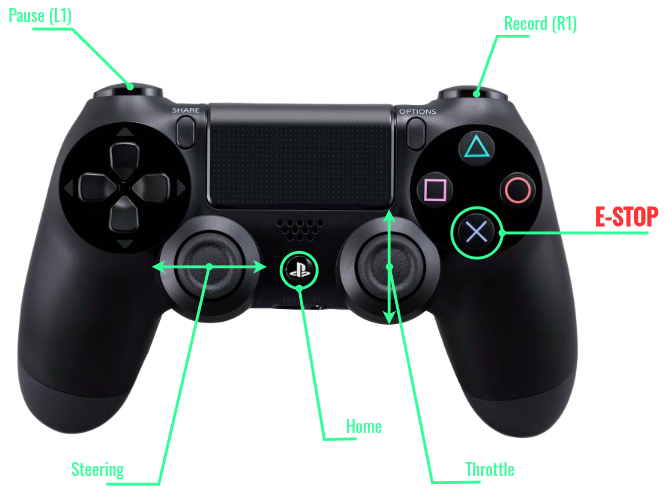
Otherwise, you can find indices of interested buttons and joystick axes using a test scripts:
2 Bluetooth Pairing
2.1 Activate Pariing Mode
On gamepad, press and hold the HOME and the SHARE button together, until the gamepads's LED starting to make double blink pattern (bluetooth pairing mode).
Warning
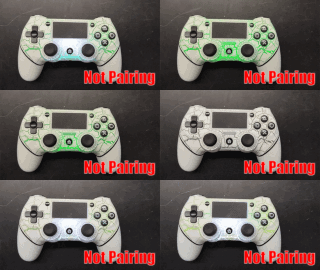
If the user release the SHARE button too quick or only pressed down the HOME button, the LED will make single blinks and the user will not be able to view/connect the gamepad.
Wait for the single blinking to be stopped by itself, then try again by pressing and holding down the HOME and the SHARE button together.
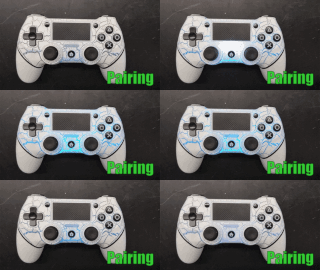
2.2 Connect Bluetooth Device
If the bluetooth device has been paired and connected to the RPi, it will be shown in the list.
Simply click the bluetooth icon (top right)  "
"device name" Connect...
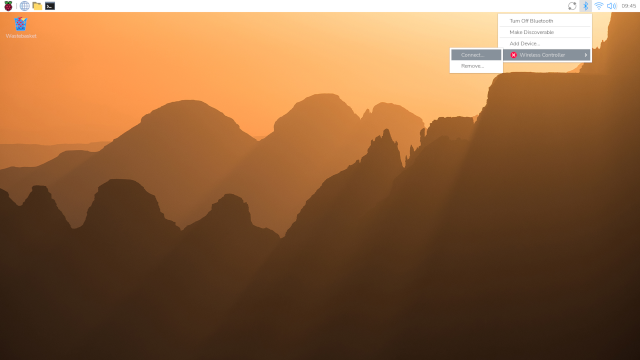
For the first time users, click the bluetooth icon (top right) "Add Device...", the following window will pop out.
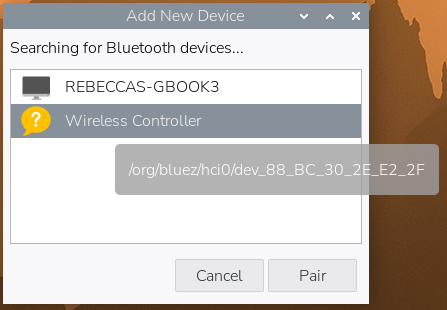
Choose the right device (Wireless Controller) to pair.
The LED on the gamepad will be stayed on after connection established successfully.
3 Connection via Command Line
There are chances your RPi is running in the headless mode (no monitor attached).
And you can connect to a bluetooth device through the command line tool: bluetoothctl
3.1 Remote Log In
In a terminal window on Host Machine, use ssh to log into RPi.
3.2 Start Pairing
press and hold down the HOME and the SHARE button together, until the gamepads's LED starting to make double blinks pattern.
3.3 bluetoothctl Usage
- In the remote terminal type:
bluetoothctl. You'll notice the command prompt changed to[bluetooth]#. - Enter
scan onto start discovering all the bluetooth devices nearby. - The gamepad ready for pairing should be listed as
[NEW] Device <MAC_address> Wireless Controller. - Enter
pair <MAC_address>to pair and auto connect to the bluetooth gamepad (You can usetabto autocomplete the<MAC_address>). - Enter
exitor simply pressCtrl+dto quitbluetoothctlinterface.